# Importing an existing wallet
### **In case you are importing an existing wallet...**
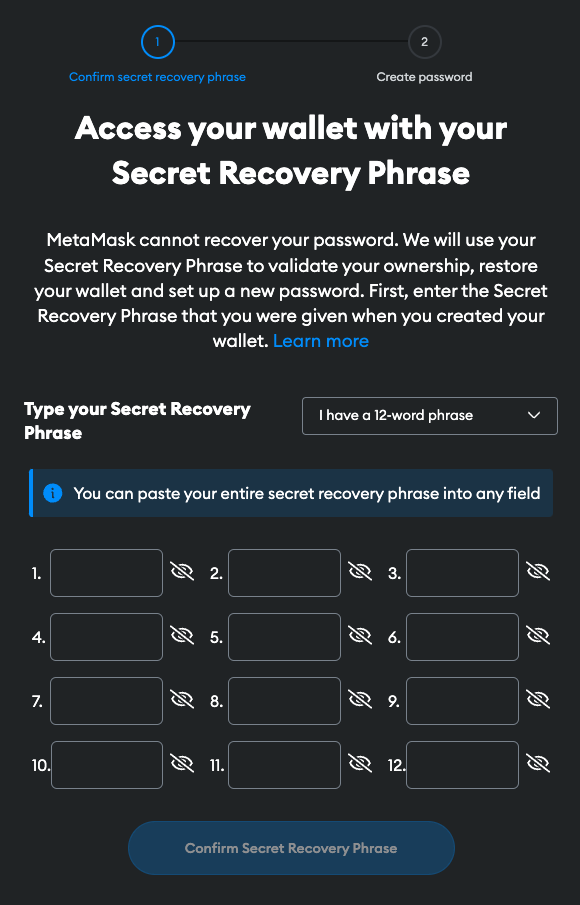
Enter the **Secret Recovery Phrase** that you were given when you created your wallet. If you initially generated your seed on a different wallet, it is usually possible to restore it for MetaMask usage as well.
_**Recovery Phrase:** The seed phrase is a unique combination of words that allows full control of your funds. NEVER share it with anyone. If you lose it, you will lose access to your funds forever. **KEEP IT IN A SAFE PLACE**._
### **Securing your wallet**
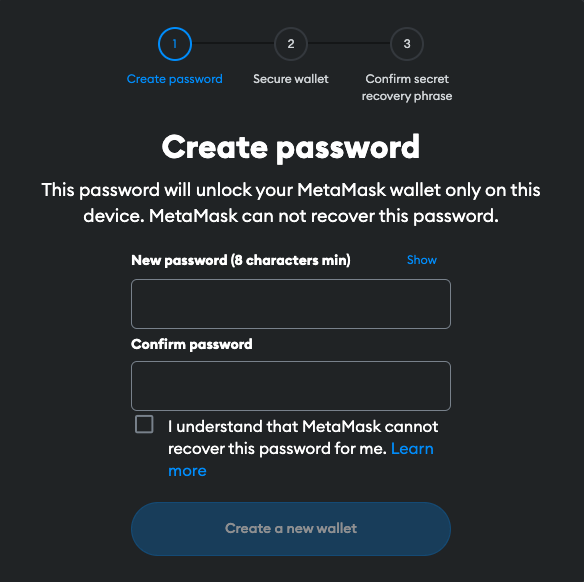
Here you will also be asked to choose a Password to protect access from your device. The password must meet the following criteria:
* Minimum of 8 characters
* It is recommended to include an alphanumeric combination
* Consider adding at least one special character for enhanced security.
> _**Password**: The password protects unauthorized access to your funds from the device. If you forget it, you can change it using the seed phrase._